Tired of Telegram’s default blue-and-white interface? You’re not alone. One of Telegram’s greatest strengths is its deep customization. And telegram themes are the fastest way to transform how your app looks, feels, and even how easy it is on your eyes during late-night chats.
Whether you prefer battery-saving AMOLED dark themes, clean light designs, bold neon aesthetics, or something totally unique, there’s a perfect theme out there for you. In this guide, we’ve handpicked the best telegram themes for both Android and Desktop, plus a deep dive into telegram x theme capabilities for power users who want total control.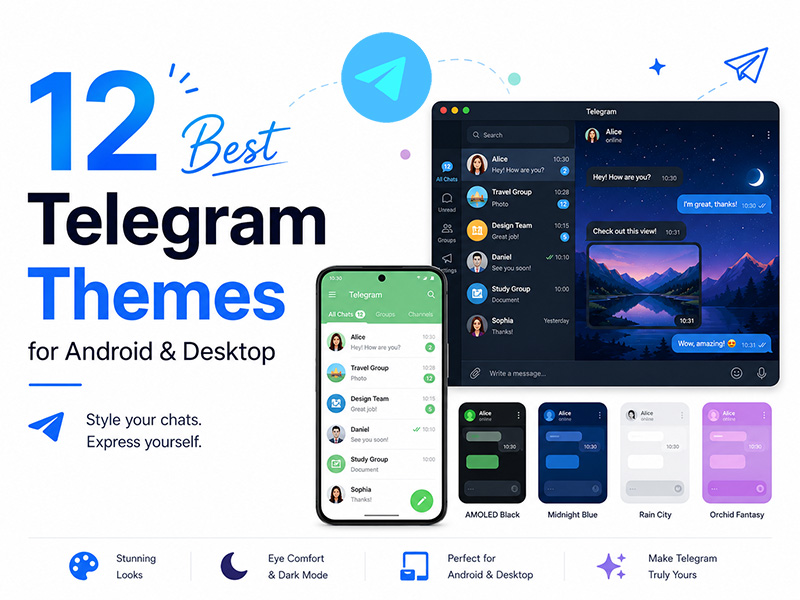
Why Custom Telegram Themes Matter
Before we jump into the list, let’s cover why switching up your telegram themes is worth your time:
- Eye comfort: Dark and low-contrast themes reduce eye strain during nighttime use
- Battery savings: Pure black AMOLED themes cut power usage on OLED screens
- Personal expression: Match your app to your style, mood, or brand aesthetic
- Better readability: Well-designed themes improve text contrast and chat clarity
- Fresh experience: A new theme can make an app you use daily feel brand new
Telegram X Theme: Next-Level Customization
If you use Telegram X on Android, you already know it’s faster and smoother than the standard app; but its theme engine is another underrated superpower. The telegram x theme system offers far more granular control than regular Telegram:
- More built-in base themes with adjustable color palettes
- Fine-tuning for every interface element
- Support for custom emoji packs and font styles
- Smoother theme transition animations
- Better compatibility with third-party .attheme files
Many of the best telegram themes on this list work even better on Telegram X, with crisper rendering and more accurate color reproduction. If you’re serious about customization, Telegram X is the best client for theme lovers.
Dark & AMOLED Collection
1. AMOLED Black Theme
Platforms: Android, iOS, Desktop
Style: Pure black, high contrast
The undisputed king of dark telegram themes for anyone with an AMOLED screen. True pixel-perfect black saves battery and eliminates glare in low light. Crisp white text and bright accent colors make every message pop without straining your eyes. This is the most popular telegram theme android pick for a reason — simple, clean, and endlessly practical.
2. Dracula Mint
Platforms: Android, iOS, Desktop
Style: Dark gray base, mint green accents
Inspired by the famous Dracula color scheme, this theme pairs a deep charcoal background with soft mint-green highlights. It’s easier on the eyes than pure black for extended reading, and the green accents feel fresh and modern. One of the best telegram themes for users who want dark mode without the harsh contrast of full black.
3. Midnight Blue
Platforms: Android, Desktop
Style: Deep navy blue, elegant and professional
If black feels too harsh but you still want a dark theme, Midnight Blue strikes the perfect balance. Rich navy backgrounds with lighter blue accents create a calm, sophisticated vibe that works great for work and business accounts. It’s one of the most polished telegram themes for professional use.
4. Discord Dark
Platforms: Android
Style: High-contrast dark gray, Discord-inspired
Love Discord’s interface? This theme brings that familiar dark-gray aesthetic to Telegram. Sharp contrast, clean bubbles, and subtle accent colors make chats easy to scan. It’s a top pick for gamers and community managers who want a cohesive look across apps.
Light & Minimal Collection
Ideal for daytime use, clean aesthetics, and anyone who finds dark modes hard to read.
5. Rain City
Platforms: Desktop
Style: Soft light gray, calm and muted
One of the most beloved light telegram themes for desktop. A gentle off-white background with cool gray accents creates a peaceful, distraction-free chat environment. It’s easy on the eyes in bright rooms and feels far more premium than Telegram’s default light theme.
6. Spacegrey
Platforms: Android, iOS, Desktop
Style: Minimalist gray, clean and modern
For minimalists, Spacegrey is perfection. Neutral gray tones, understated accents, and zero visual clutter let your content take center stage. It’s one of the best telegram themes for productivity-focused users who want their interface to fade into the background.
7. Simple Mint
Platforms: Android
Style: Dark gray base with mint highlights
Not quite dark, not quite light. Simple Mint hits the sweet spot. A muted dark-gray background paired with soft mint-green buttons and accents feels fresh and calming. It’s a fantastic telegram theme android choice for users who want something different without going full neon.
Bold & Expressive Collection
For users who want their Telegram to stand out from the crowd.
8. Elemental Blue
Platforms: Android, Desktop
Style: Vibrant saturated blue, energetic and clean
If you love blue but want something bolder than Midnight, Elemental Blue delivers. Rich, saturated blue tones give the app a lively, energetic feel while remaining clean and readable. It’s one of the most popular colorful telegram themes that still feels polished.
9. Orchid Fantasy
Platforms: Android, Desktop
Style: Soft purple-pink, dreamy and elegant
Dreamy lavender and soft pink accents over a dark base create a graceful, luxurious look. Perfect for users who want something feminine and refined without being overly bright or childish. Orchid Fantasy is consistently ranked among the best telegram themes for aesthetic appeal.
10. Vapor Neon
Platforms: Android
Style: Cyberpunk neon, vibrant and retro-futuristic
Go full cyberpunk with glowing neon accents against a deep black background. Bright pinks, electric blues, and glowing outlines make every chat feel futuristic. It’s bold, it’s fun, and it’s guaranteed to make your Telegram stand out. Not for everyone, but if you love it, you’ll really love it.
Desktop Exclusive Picks
These themes are optimized specifically for Telegram’s desktop client.
11. Blue Dark
Platforms: Desktop only
Style: Deep blue-black, high contrast
The gold standard for desktop dark mode. Perfectly balanced contrast, readable text, and a professional color palette make this the most popular desktop telegram theme. It works beautifully on large monitors and reduces eye strain during long work sessions.
12. RainFall
Platforms: Desktop only
Style: Dark with soft blue accents, moody and calm
RainFall pairs a dark background with gentle blue gradient accents for a calm, atmospheric feel. It’s less harsh than pure black and more interesting than plain gray. If you spend hours on Telegram desktop every day, this is one of the best telegram themes for long-term comfort.
How to Install Telegram Themes
1. For Android
- Find a theme link or .attheme file
- Tap the link; it will open directly in Telegram
- Tap Apply in the preview window
- To customize further: Go to Settings > Chat Settings and use the built-in theme editor
2. For Desktop
- Download a .tdesktop-theme file
- Open Telegram Desktop
- Go to Settings > Chat Settings
- Click Create new theme or drag the theme file into the app
- Adjust colors as needed and save
Pro tip: Most of the best telegram themes have both Android and desktop versions, but always check compatibility before installing.
Final Thoughts
With so many amazing telegram themes available, there’s no reason to stick with the default interface forever. Whether you’re team dark mode on Android, a minimalist desktop user, or someone who loves bold, expressive designs, there’s a perfect theme waiting for you.
And if you really want to push customization to the limit, don’t sleep on the telegram x theme system. It’s the most powerful theme engine Telegram has to offer.
The best part? You can switch themes whenever you want. Try a few from this list, see which ones feel right, and give your daily Telegram experience the refresh it deserves.