
Telegram X for Android
Telegram X is a next-generation messaging experience built for users who want faster performance, smoother animations, and access to Telegram’s newest experimental technologies.
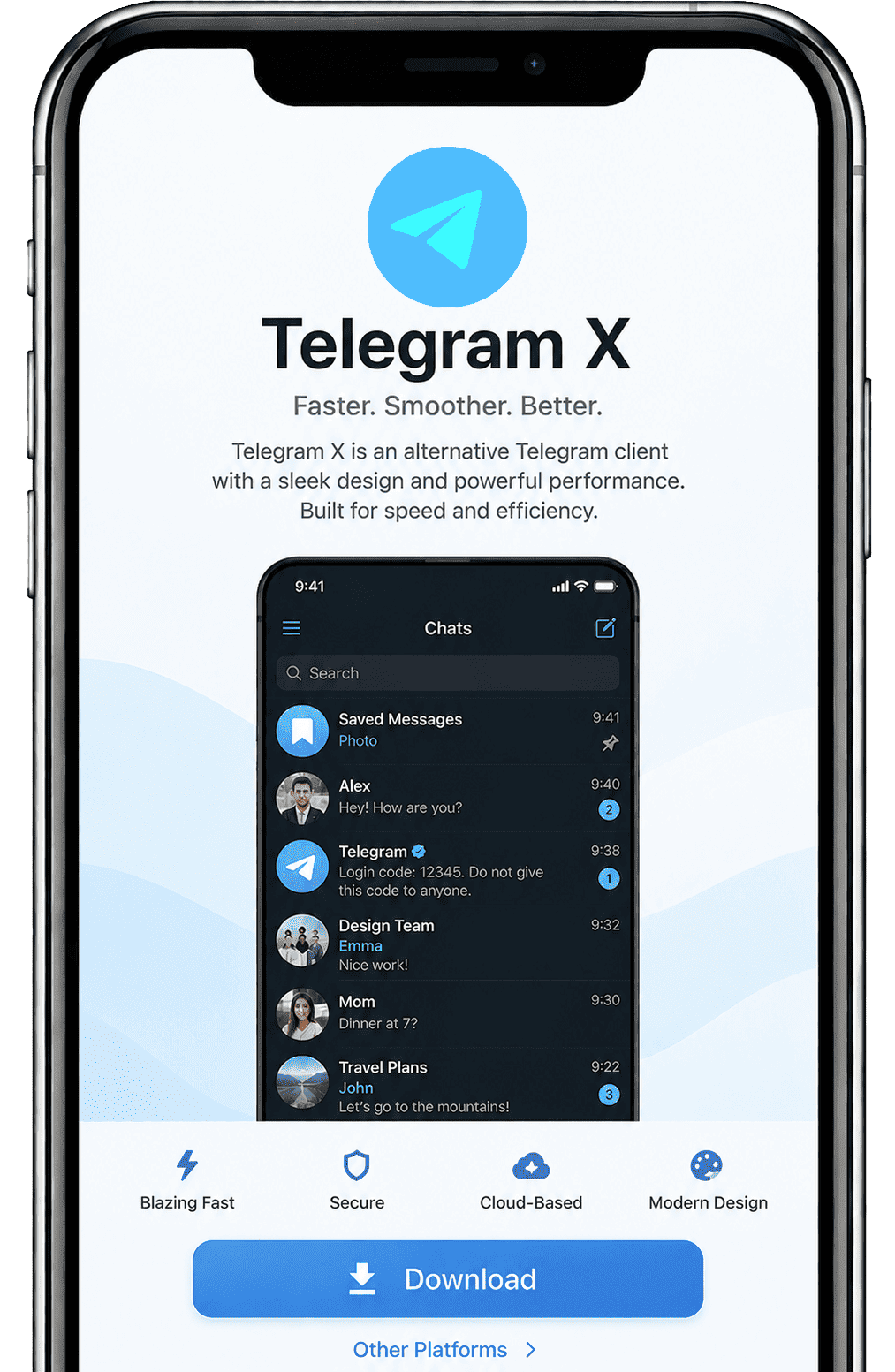
Telegram X, on the other hand, is Telegram’s official experimental client. It is developed by the same team behind the main Telegram app and is designed to test new features, interface designs, and performance improvements before they are added to the main app. Originally known as “Challegram,” this third-party client was acquired by Telegram and rebranded as Telegram X. The original developer, Vyacheslav Krylov, has also successfully joined the Telegram team, becoming one of its members.
Telegram X was built from scratch using entirely new code, rather than relying on parts from the older app. It acts as a place to testing ground for new features and technologies, which helps speed up the development of the main Telegram platform. You can download the Telegram X APP to experience its smooth animations and new experimental features that differentiate it from Telegram.
Features and performance of Telegram X
Bubble-Free Chat
Telegram X comes with a clean, bubble-free chat mode, giving messages and photos more space. When you’re browsing photos in a channel, images stretch across the full width of your screen, making them more intuitive and detailed.
Chat Preview
Just tap and hold any chat to preview it without opening. You can quickly get the chat topic from the preview. This function is not only applicable to the chat interface, but also to the "Forward", "Share" menu, "Call" list, and "Shared Groups".
Channel View Counts
In Telegram X Latest Version, you don’t need to open a channel to see how posts are doing. You can check view counts for recent posts right from the main screen and receive view data for different posts all at once.
Unrestricted
Send files and media up to 2GB without needing to compress them, which is much more than other messaging apps allow. Combined with ultra-fast transfer speeds, it's the ideal choice for everyday file transfers.
Slide operation
Swipe between chats, reply quickly, or open media without digging through menus. Swipe left or right on the home screen to switch between “Chats” and “Calls.” You can also swipe right on any message to instantly bring up the forward menu.
Cleaner Interface
Telegram X has updated its music player and attachment menu. The info page is now optimized for finding shared files. The layout is more minimal. There’s less visual clutter, so it’s easier to focus on conversations.
Highly Custom
Without needing third-party apps, the brand-new design allows you to freely customize the chat interface. Offers more customization options than Telegram, including settings for colors and font sizes.
Performance: Where Telegram X Really Stands Out
One of the best things about Telegram X is its great performance. It is faster and smoother than the standard Telegram app, making it a more seamless daily user experience.
Faster Loading Times
Standard Telegram often lags when switching chats in mega-groups. Telegram X fixes this by leveraging TDLib 2.0, delivering smooth transitions even under heavy load. Its better design and more efficient coding allow it to handle data quickly in the background, so you don't have to wait.
Better Resource Management
On a Pixel 8, Telegram X loaded a 1GB media folder 40% faster than Telegram 2026 standard, consumes less memory and CPU resources. During long sessions, it experiences less latency and higher sync rates; when multitasking, it handles multiple tasks at once without lag or delay, effectively improving multitasking efficiency.
Smoother Animations
Compared to the more conservative design of the standard Telegram, Telegram X is smoother and more visually appealing. Its fast animations and quick response times provide a better experience, even on older devices where it runs with less lag.
Battery efficiency improvement
Telegram X demonstrates superior efficiency in battery consumption and device resource management. Telegram X Update is specifically optimized for power saving, making it particularly suitable for users who spend extended periods on messaging or for field teams with limited access to charging facilities.
Telegram vs Telegram X: What’s the Real Difference?
Telegram X and Telegram are made by the same team and are very similar. They share the same account, the same chats, and the same core features. You can message, send files, and join groups—no difference there.
The real gap shows up in how Telegram X and Telegram feel.
Here’s a clear side-by-side breakdown:
| Aspect | Telegram X | Telegram |
| Overall Feel | Smoother | Stable |
| Performance | Optimized for speed | Normal optimized |
| Animations | More polished | Simpler |
| Feature Updates | Sometimes delayed or experimental | Official features |
| Stability | Can have bugs | More reliable |
| User Interface | Modern | Classic |
| Battery Usage | More efficient | More power consumption |
| Development | Experimental and performance-driven | Mainstream and fully supported |
Telegram app prioritizes stability and simple functions, making it more complete and reliable. In contrast, the standard Telegram X focuses on speed and smooth interaction, offering a lightweight and experimental experience.
A key feature of Telegram X: Bots
Bots are a big part of the Telegram X experience. Just like in Telegram, bots are automated accounts that can help you do things faster—whether it’s getting information, managing tasks, or even having fun.
What is the robot in Telegram X?
Bots are programs that run inside Telegram X’s system. They are created by third-party developers using the Telegram Bot API. You can chat with them just like a normal contact.
They can do many things, for example:
• Send news updates
• Download media
• Translate messages
• Manage group chats
• Provide customer support
How to UseTelegramBots?
Using a bot is just like chatting; you simply give it commands to help you get things done.
• Open the bot chat
• Tap “Start”
• Send commands, like `/help /start /settings`
• Or press the buttons provided by the bot
Some bots work in private chats, while others can be added to groups to help manage members, filter spam, or run polls.
How to create Telegram Bot?
Creating a bot is easier than most people expect, but you will need at least some skills in computer programming.
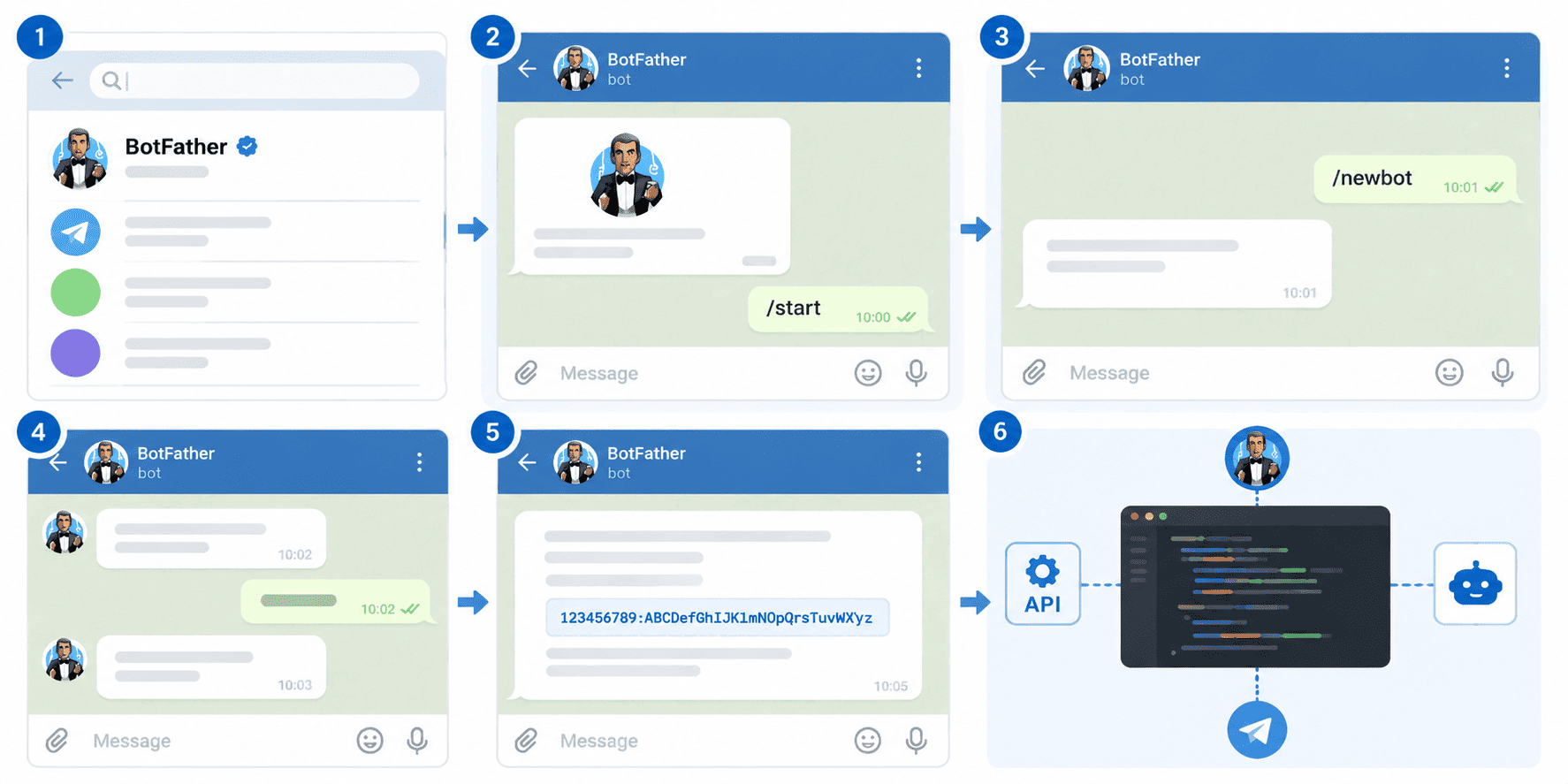
On Telegram, there’s an official bot called BotFather. It helps you create and manage your own bots.
Basic steps:
1. Search for BotFather
2. Start a chat and type `/start`
3. Use the command `/newbot`
4. Follow the instructions to name your bot
5. You’ll get a token (this is like a password for your bot)
After that, you can connect your bot to code using APIs and decide what it should do.
How to Find and Get Telegram X Bots?
You don’t need to create a bot to use one. There are thousands already available.
• Search directly in Telegram X
• Get links from websites or communities
• Join groups where bots are shared
The official platform only has a few bots for specific purposes, such as @gif and @Stickers. The rest of the bots are created by third-party developers using the Telegram Bot API and the platform.
Are Bots Safe?
The bots are like strangers you encounter in a group chat. They can see your public name, username, and profile picture, as well as the messages you send them, but they can’t see your phone number or other private information.
Please note the following during use:
• Don’t share personal or sensitive info
• Avoid suspicious or unknown bots
• Check reviews or community feedback before using
Bots in Telegram X are powerful and easy to use. Creating or finding useful robots will help you complete tasks better.
Security in Telegram X
Security is still based on Telegram’s main system, so you’re not losing protection by using Telegram X.
Encryption Protocols
From version 4.6 onwards, Telegram used MTProto 2.0, providing stronger authentication for the two types of chat encryption used within Telegram X:
1. Cloud Chats: Uses 256-bit symmetric AES encryption with Perfect Forward Secrecy that changes keys after each message. Messages are stored in the encrypted Telegram cloud, allowing for multi-device synchronization.
2. End-to-end encryption for Secret Chats: Messages are encrypted on the sender’s device and only decrypted on the recipient’s device. Only stored on the devices involved, not in the cloud.
Key Security Features
• Two-Factor Authentication (2FA): Adds an extra layer of security by requiring both an SMS code and a custom password
• Self-Destruct Timers: In secret chats, messages can be set to automatically disappear after being read
• Screenshot Alerts: Telegram X attempts to detect and notify users of screenshots in secret chats
• Session Management: Monitor and terminate active sessions across devices, showing device type and IP addresses
• Account Self-Destruct: Automatically deletes your account and all data after a period of inactivity
• Encryption Key Verification: When starting a secret chat, Tele X displays an encryption key image that you can compare with your contact’s verification image
Different security features have made messages much more private and safe.
How to Download Telegram X?
Telegram X can be downloaded normally through the normal method, but in some countries, you may not be able to get the correct download link. Therefore, the following method applies to users in all regions

Step 1: Search for “Telegram X”, find trustworthy websites
Some websites’ installation packages may contain replacements or be incomplete. Therefore, please download apps only from trusted websites such as telegramxmod.com.
Step 2: Check that the developer is official Telegram FZ-LLC
Telegram FZ-LLC is the only creator of Telegram X. If no developer is listed, the software may not be the official Telegram X app.
Step 3: Enable “Install from unknown sources” in your phone settings
Open Settings > Security. Turn on the option to “Install unknown apps” or “Unknown sources” for your browser or file manager.
Step 4: Download the latest Telegram X APK
The Telegram X Latest Version includes the latest features, fixes old bugs, and addresses issues. Download the latest version to experience the newest features.
Step 5: Install the file
Locate the Telegram X APK file, and click “Install”.
After installation, log in to your Telegram account. Your data will automatically sync between Telegram and Telegram X.
Using Telegram X: Essential Considerations
Manually enable end-to-end encryption: The default chat uses cloud-based encryption. For the highest level of privacy, you can start a “Secret Chat,” which enables end-to-end encryption.
You can set auto-delete timing: By default, accounts may be deleted after six months of inactivity, but you can adjust this in settings.
Inactive accounts may be removed: To keep your account active, please log in regularly. Setting a reminder to sign in every few months can help preserve your data and chats.
Proprietary Protocol: Telegram relies on its independently developed MTProto protocol. While robust, it differs from other widely used standards. You can enable the end-to-end encrypted feature, which is the closest option to the industry standard.
Experience may vary by device: Although Telegram X is optimized for performance, your device’s specifications and settings can affect speed and battery life. Closing background apps and updating your OS can help optimize performance.
Has a slight learning curve: Telegram X introduces a gesture-based interface and a refreshed layout, which may feel new at first. Spend a few minutes exploring the new interface, and you’ll get used to it in no time.
Popular Third-Party Telegram Clients
Telegram X and Telegram are built on TDLib. TDLib, or Telegram Database Library, is a cross-platform, fully functional Telegram client. They designed it to help third-party developers create their own custom apps using the Telegram platform.
TDLib is fully open source; all code is available on GitHub. Therefore, there are many Telegram X mod APK.
Nicegram
Often considered the best Telegram client for advanced users, Nicegram offers features like custom folders, enhanced privacy settings, and the ability to unblock restricted channels. Compared to Telegram X No Ads, its chat interface contains ads.
Unigram
A Windows-focused Telegram X PC that provides multi-account support, enhanced file management with drag-and-drop functionality, an in-app music player, channel statistics, and customizable keyboard shortcuts. It fills the gap in Telegram X’s lack of a web version.
Kotatogram
Available for Windows, macOS, and Linux. Telegram X Desktop client introduces innovative features like unquoted forward capability and clickable links in bio sections. Compared to Telegram X, it supports iOS.
Plus Messenger
Known for extensive customization options, Plus Messenger allows users to personalize virtually every aspect of their messaging experience, from themes to notification settings. However, it’s not as smooth as Telegram X, and it contains ads on the topic page.
Graph Messenger
Designed for power users, this client supports managing over 100 active accounts, includes advanced text editing tools, voice changing features, and a hidden section for confidential chats with password protection. It offers more features than Telegram X, but its complexity makes it harder to learn.
Security Considerations for Third-Party Clients
While third-party clients offer enhanced features, they also present potential security risks:
1. Unofficial maintenance: These clients are not developed or maintained by Telegram’s official team
2. Potential Backdoors: Malicious versions could contain hidden surveillance features
3. Delayed Security Updates: May not receive security patches as quickly as official clients
4. Privacy Policy Variations: Different data handling practices from Telegram’s official policies
5. Security Gap: Since it’s built using the official source code, while it won’t get your account banned, its security is inferior to the official application.
How to Choose: Telegram X or Telegram?
1. Your habits.
For users who heavily rely on chat applications, performance matters more. Telegram X is faster than Telegram when switching chats, opening images, or browsing large groups. Telegram X works well if you need to reach large groups quickly.
2. Speed vs Stability
- Telegram X focuses on smooth animations, faster response, and a lighter feel
- Telegram focuses on reliability, fewer bugs, and consistent updates
If you hate lag and care about fluid motion, Telegram X will stand out.
3. New Features
Telegram’s new features are migrated from Telegram X
Telegram X features more experimental functions and is the best choice for experiencing new features.
4. Device and Platform Matters
- On Android, Telegram X is well-supported and runs very smoothly
- On iPhone, Telegram X is less active, so Telegram is usually the better option
- On older phones, Telegram X may feel lighter and faster
The “best” choice can depend on the device you’re using, but in most cases, Telegram X is compatible with more devices.
5. Bots + Telegram X Performance
Because Telegram X is optimized for speed, interacting with bots often feels faster—commands respond quickly, and menus load smoothly. This makes a difference if you use bots a lot for daily tasks.
6. UI and Interaction
Telegram still uses a menu-based system, requiring more clicks to switch to other media.
Telegram X changes how you interact with the app.
• More gestures: swipe to reply, switch chats, etc.
• Cleaner and more minimal interface
• Smoother transitions
Telegram’s classic layout is ideal if you prefer stable app and want to avoid learning new features.
If you care about how fast things open, how smooth scrolling feels, or how clean the app looks, Telegram X will probably feel better.
Blogs
Blogs Content Part

Frequently Asked Questions
Can I use Telegram and Telegram X together?
Yes, you can install and use both applications on the same device with the same account. They will sync your messages and conversations since they connect to the same Telegram cloud.
Why does Telegram X sometimes lack features available in the main Telegram app?
Telegram X’s experimental nature means it sometimes focuses on testing specific interface or performance improvements rather than implementing every feature from the main app.
Are there any costs associated with using Telegram X?
No, Telegram X is completely free to download and use, just like the standard Telegram app.
How many accounts can I have on Telegram X?
Telegram X allows you to use and switch between up to 3 accounts at the same time in one app. You can add other accounts in the Telegram X app by tapping the “Add Account” option.
How to hide phone number in Telegram X?
1. Open Telegram X and go to Settings.
2. Tap on Privacy and Security>Phone Number
3. Under “Who can see my phone number,” select Nobody or My Contacts.
4. Under “Who can find me by my number,” select My Contacts to prevent strangers from finding you via your phone number.
5. Tap the checkmark (top right) to save settings.
How to delete Telegram account permanently on Android?
1. Open the Telegram app and go to Settings.
2. Select under Help, Telegram FAQ.
3. Scroll down to the “Your Account” section and tap “Delete your Telegram account”.
4. Tap the deactivation page link, which will take you to the browser.
5. Enter Phone Number: Type in your phone number in international format.
6. Enter Code: A confirmation code will be sent to your Telegram app and not via SMS. Copy and paste this code on the webpage.
7. Delete Account: Click “Sign In,” provide a reason if you want, and click “Delete My Account”.
8. Confirm: Click “Yes, delete my account” to finalize.
How to download movies from Telegram X?
1. Find the Telegram Movies channel: Click search to find a movie channel that interests you.
2. Apply to join the channel.
3. Find the movie download link.
4. Click the button to start downloading.
5. Once the movie is downloaded, it will be saved in a folder named “telegram” or “telegram desktop”.
Final Thoughts
The existence of Telegram X reflects Telegram’s unique position in the messaging landscape—a platform willing to challenge its own conventions in pursuit of better user experiences. If you’re already a power user of Telegram, you can’t afford to miss Telegram X. It brings together Telegram’s most forward-thinking experiments, letting you touch the future of communication ahead of time.
Telegram X shows how Telegram is evolving, and its new features give a preview of Telegram’s future. Download Telegram X today, and you’ll feel firsthand how Telegram is evolving and experience next-level speed and smoothness.